How to buy an eSIM with crypto: USDT, TON, BTC and more
If your travel money is in stablecoins, there's no need to hunt for a card that works abroad. A Tutu travel eSIM can be paid for with crypto in a couple of taps — on tutuesim.com or inside Telegram.
Which coins you can use
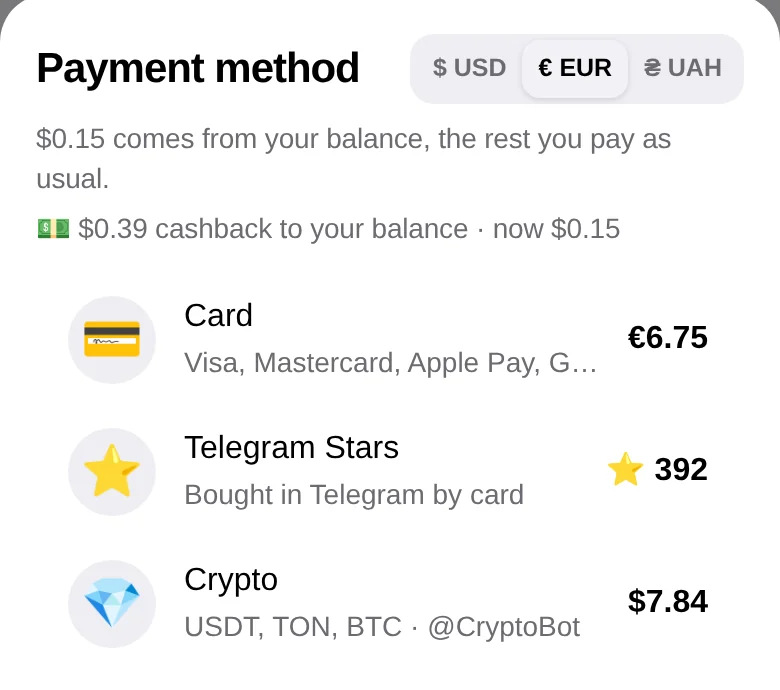
Payments go through @CryptoBot (Crypto Pay), one of the largest crypto wallets in Telegram. You can pay with USDT, TON, BTC, ETH and other coins CryptoBot supports. The price is set in US dollars, and the invoice shows the exact amount in the coin you choose.

Buying on the website
- Pick the country and a plan on the countries page.
- Enter the e-mail the eSIM should go to and press “Pay with crypto”.
- Pay the invoice from your CryptoBot wallet in Telegram, or from an external wallet on the invoice page.
- As soon as the payment is confirmed, the order page shows the QR code and the “Install eSIM” button, and the same arrives by e-mail.
Buying in Telegram
In the @tutuesimbot bot or its Mini App choose the country and plan, then “Crypto”. The invoice opens in CryptoBot, and after payment the eSIM arrives in the chat. In Telegram you can also pay with Telegram Stars or by card — whichever is easier.
What it costs
The plan price is the same as for card payment: for example, Turkey 5 GB for 30 days is $7.49, UAE 5 GB is $10.99, Thailand 5 GB is $6.99, and USA starts at $2.99. Paying from a CryptoBot balance has no network fee; from an external wallet you pay the usual blockchain fee for your network.
If something goes wrong
- The invoice is valid for one hour; if it expires, just start a new order.
- If an eSIM can't be issued after payment, a purchase made in Telegram is refunded automatically to your CryptoBot wallet; for website crypto orders, support sends the refund by hand.
- Support answers in Telegram every day — include your order number.
Before you pay
Make sure your phone supports eSIM and isn't carrier-locked — see “Compatible devices”. Then install the eSIM at home over Wi-Fi and switch it on for mobile data when you land, as described in the installation guide.
Need data on your trip?
An eSIM for 193 countries in a minute — no roaming, no paperwork.
Pick a countryPopular destinations




More articles
A plain explanation: what an eSIM is, how it differs from a regular SIM, which phones support it and how to get a travel eSIM in a minute.
2 min read · Read →
We compare your carrier's roaming with a travel eSIM: prices, convenience, calls and data. When roaming is fine and when an eSIM saves money.
2 min read · Read →
Mobile data in Turkey without roaming: how much data you need for a week, plans and unlimited, prices and how to install the eSIM before you fly.
2 min read · Read →
Which apps to install before a trip to Turkey: BiTaksi, Uber, iTaksi, İstanbulkart, Moovit, offline translation and food delivery — and how to have data for them from the first minute.
2 min read · Read →
Landed and no data? A step-by-step check for iPhone and Android: data roaming, the right line, carrier network, APN, plan limits and VPN settings.
2 min read · Read →
A step-by-step guide for iPhone and Android: how to save a city map in Google Maps, what works without internet and what doesn't, and when Organic Maps or Maps.me is the better choice.
2 min read · Read →